阅读背景:

【uniapp】记录地址管理页面

来源:互联网 
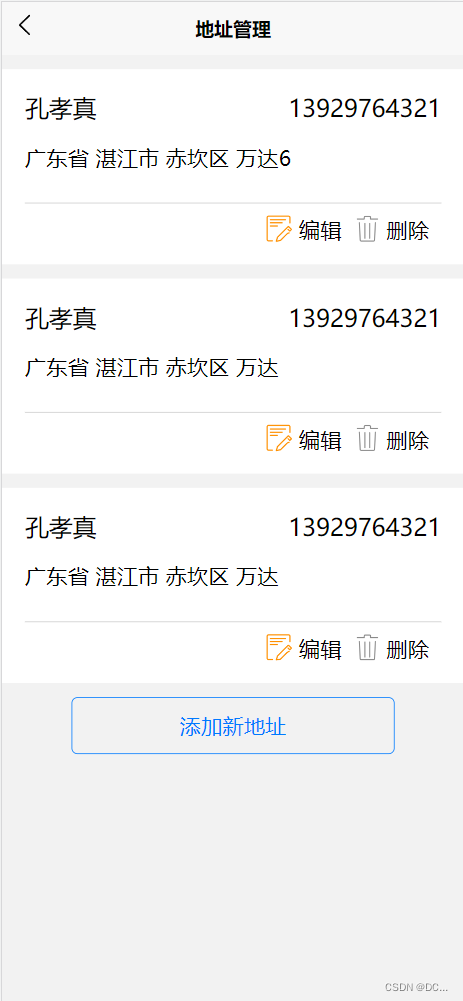
uniapp中的地址管理页面

在这里插入图片描述

<template> <view class="container"> <view class="oldaddress" v-for="(item,index) in cardInfo" :key="index"> <view class="topview"> <view class="name">{ {item.username}}</view> <view class="phone">{ {item.phone}}</view> </view> <view class="building"> { {item.address}} </view> <view class="editing"> <view class="pho"> <image src="../../static/editing.png" mode=""></image> </view> <view class="word1"> 编辑 </view> <view class="pho"> <image src="../../static/delete.png" mode=""></image> </view> <view class="word"> 删除 </view> </view> </view> <!-- 新增 --> <button type="primary" plain="true" class="btn" @click="toadd">添加新地址</button> </view> </template> <script setup> import { ref, reactive } from 'vue'; let cardInfo = reactive([{ username: '孔孝真', address: '广东省 湛江市 赤坎区 万达6', phone: '13929764321', }, { username: '孔孝真', address: '广东省 湛江市 赤坎区 万达', phone: '13929764321', }, { username: '孔孝真', address: '广东省 湛江市 赤坎区 万达', phone: '13929764321', } ]) let toadd = () => { uni.navigateTo({ url: '/pages/address/address', fail(error) { console.log(error) } }) } </script> <style lang="less" scoped> .container { width: 100vw; height: 95vh; background-color: rgb(242, 242, 242); padding-top: 1px; } .oldaddress { width: 100vw; // height: 300rpx; background-color: #fff; padding: 5% 5% 2%; box-sizing: border-box; margin: 3% 0 ; .topview { width: 100vw; .name { display: inline-block; width: 40%; font-size: 20px; color: black; } .phone { display: inline-block; width: 50%; text-align: right; font-size: 20px; color: black; } } .building { margin-top: 16px; font-size: 18px; color: black; padding-bottom: 50rpx; border-bottom: 1px solid #ccc; } } .editing { display: flex; justify-content: flex-end; margin: 10px; .pho { width: 23px; height: 23px; vertical-align: middle; image { width: 100%; height: 100%; } } .word1 { font-size: 18px; margin-left: 5px; vertical-align: middle; margin-right: 10px; } .word { font-size: 18px; margin-left: 5px; vertical-align: middle; } } .btn { width: 70%; } </style> <template> <view class="container


你的当前访问异常,请进行认证后继续阅读剩余内容。

分享到: