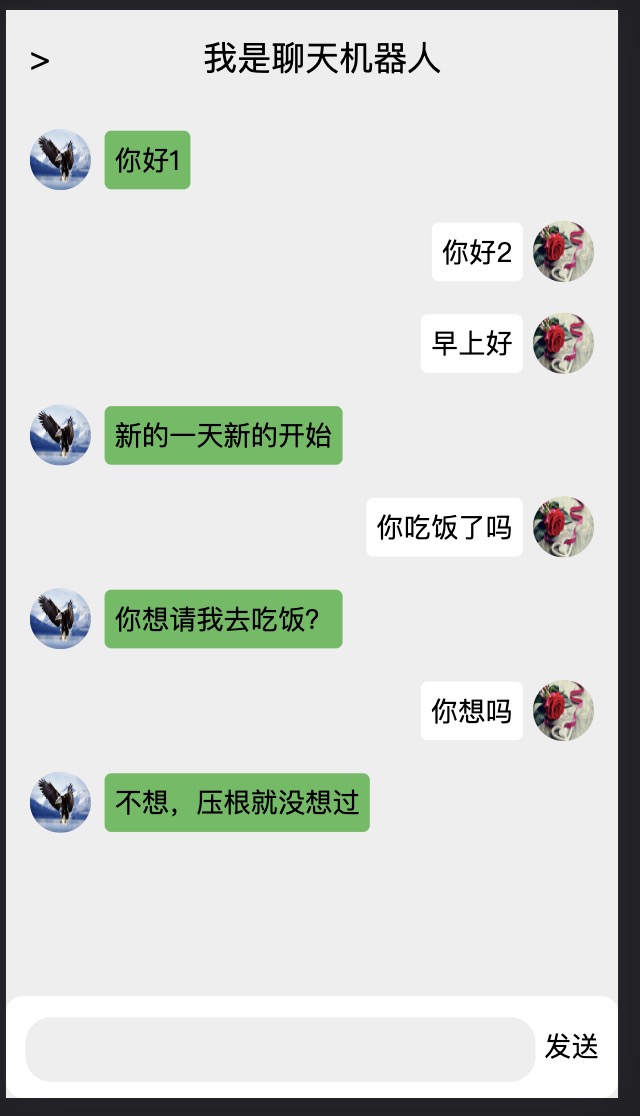
先看效果:
<!DOCTYPE html>
<html lang="en">
<head>
<meta charset="UTF-8">
<meta http-equiv="X-UA-Compatible" content="IE=edge">
<meta name="viewport" content="width=device-width, initial-scale=1.0">
<title>Document</title>
<style>
* {
margin: 0;
padding: 0;
}
html,
body,
#wrap {
width: 100%;
height: 100%;
background: #eee;
position: relative;
}
header {
text-align: center;
font-size: 20px;
padding: 14px;
box-sizing: border-box;
}
header span {
float: left;
}
main {
width: 100%;
height: calc(100% - 116px);
padding: 14px;
box-sizing: border-box;
}
main section {
width: 100%;
display: flex;
align-items: center;
margin-bottom: 18px;
}
.right {
position: relative;
height: 36px;
}
.img-wrap {
width: 36px;
height: 36px;
}
.left-img {
margin-right: 8px;
}
.content-left {
background: rgb(92, 188, 92);
padding: 6px;
border-radius: 4px;
}
.content-right {
position: absolute;
right: 42px;
background: #fff;
padding: 6px;
border-radius: 4px;
}
.right-img {
margin-left: 8px;
position: absolute;
right: 0;
}
.my-img {
width: 100%;
height: 100%;
border-radius: 50%;
}
footer {
position: absolute;
bottom: 0;
width: 100%;
height: 60px;
background: #fff;
box-sizing: border-box;
border-radius: 10px;
text-align: center;
line-height: 60px;
}
footer input {
border-radius: 15px;
width: 300px;
height: 38px;
border: 0;
background: #eee;
padding: 15px;
box-sizing: border-box;
}
</style>
</head>
<body>
<div id="wrap">
<header>
<span>></span>
我是聊天机器人
</header>
<main>
<section class="left">
<div class="img-wrap left-img">
<img class="my-img" src="./img/you.jpeg" alt="">
</div>
<div class="content-wrap content-left">你好1</div>
</section>
<section class="right">
<div class="content-wrap content-right">你好2</div>
<div class="img-wrap right-img">
<img class="my-img" src="./img/me.jpg" alt="">
</div>
</section>
</main>
<footer>
<input type="text" />
<span class="send">发送</span>
</footer>
</div>
<script src="https://cdn.jsdelivr.net/npm/[email protected]/dist/axios.min.js"></script>
<script>
let main = document.querySelector('main');
let input = document.querySelector('input');
let send = document.querySelector('.send');
// 点击“发送”按钮发送消息
send.addEventListener('click', () => {
let spoken = input.value;
main.innerHTML += ` <section class="right">
<div class="content-wrap content-right">${spoken}</div>
<div class="img-wrap right-img">
<img class="my-img" src="./img/me.jpg" alt="">
</div>
</section>`;
input.value = '';
axios({
url: 'https://hmajax.itheima.net/api/robot',
params: {
spoken
}
}).then(res => {
main.innerHTML += ` <section class="left">
<div class="img-wrap left-img">
<img class="my-img" src="./img/you.jpeg" alt="">
</div>
<div class="content-wrap content-left">${res.data.data.info.text}</div>
</section>`;
});
});
// 按下回车键发送消息
input.addEventListener('keydown', e => {
// enter键的键盘码是13
if (e.keyCode === 13) {
send.click();
}
});
</script>
</body>
</html>
<!DOCTYPE html>
<html lang="en">
<head>
<met